
QC Rejected NADRA Meaning and Complete Solution Guide 2026
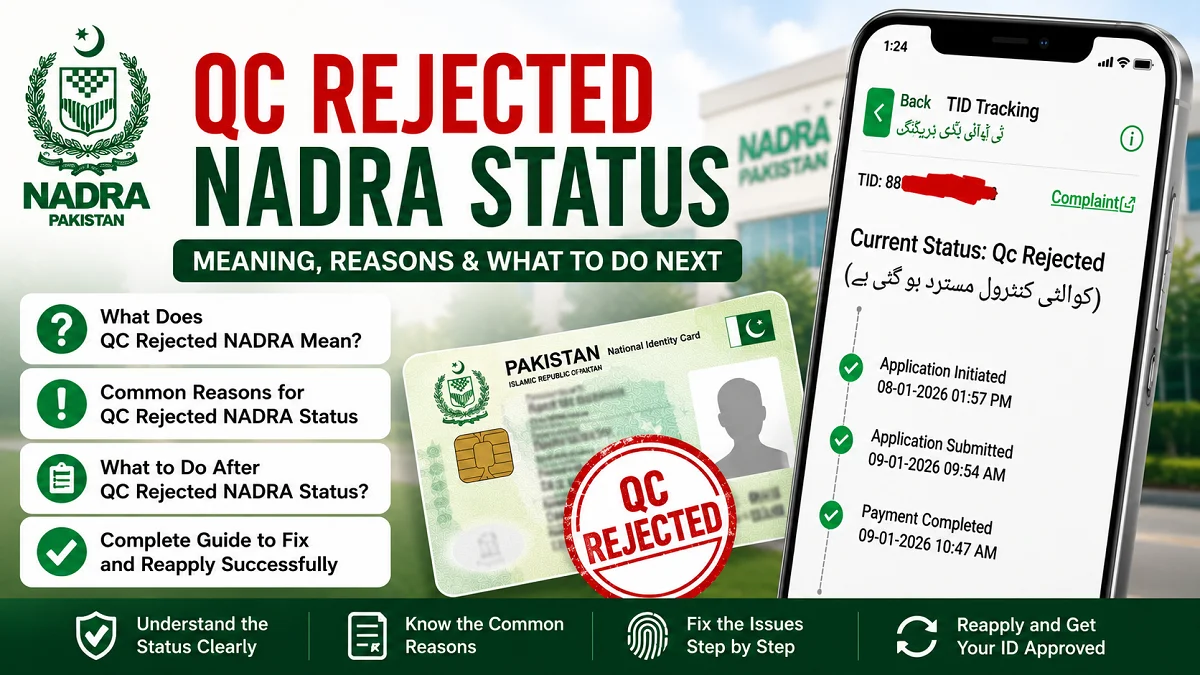
If we apply for a CNIC, Smart Card, B-Form, Family Registration Certificate, or any other document through NADRA, we may sometimes see the status “QC Rejected NADRA.” This status often creates confusion because many applicants do not understand what it means or what steps they should take next.
In simple words, QC Rejected NADRA means that our application failed the Quality Check (QC) process during verification. NADRA reviews submitted information, photographs, fingerprints, signatures, and supporting documents before approving an application. If any issue appears during this verification stage, the application may be rejected.
Understanding the actual reason behind the rejection is important because different problems require different solutions. In some cases, we only need to update a photograph or biometric record. In other situations, we may need to submit additional documents or correct personal information.
Many Pakistani citizens encounter this issue while applying for:
- New CNICs
- Smart National Identity Cards
- CNIC renewals
- B-Forms
- Family Registration Certificates
- NICOP applications
- POC applications
The good news is that most QC rejection cases are temporary and can be resolved with proper corrections and resubmission.
This detailed guide explains everything we need to know about QC Rejected NADRA status, including its meaning, common causes, solutions, processing timelines, and practical tips to avoid rejection in future applications.
What Does QC Rejected NADRA Mean?
The term QC stands for “Quality Check.” During this stage, NADRA carefully verifies all details submitted in an application before approving and printing official identity documents.
This process acts as a security and validation layer within Pakistan’s national database system. NADRA officers and automated systems examine biometric records, photographs, personal details, family linkage, and supporting documents to ensure that the information is accurate and authentic.

When the status shows QC Rejected NADRA, it means the application failed this verification stage due to one or more detected issues. The rejection can happen in both online and physical applications submitted at NADRA Registration Centers.
A QC rejection does not always indicate fraud or serious problems. In many situations, the issue may simply involve a blurry image, fingerprint mismatch, incorrect spelling, or incomplete document upload.
Applicants should not panic after seeing this status. Instead, they should identify the exact reason behind the rejection and complete the required corrections.
Why NADRA Uses the QC Process?
NADRA introduced the quality check system to maintain the accuracy and security of Pakistan’s identity database.
The QC process helps NADRA:
- Prevent identity theft
- Detect duplicate registrations
- Stop fake document submissions
- Verify family relationships
- Improve biometric authentication
- Ensure accurate citizen records
Without the QC process, errors and fraudulent entries could create serious legal and security problems.
Importance of NADRA QC Verification in Pakistan
NADRA records are connected with many government and private services across Pakistan. Incorrect data can create issues in:
- Passport applications
- Banking services
- SIM registration
- Property transactions
- Educational admissions
- Visa processing
- Tax documentation
This is why NADRA applies strict verification standards before approving any identity-related application.
Common Reasons for QC Rejected NADRA Status
There are multiple reasons why an application may fail the quality check process. Some are technical issues, while others relate to missing or mismatched information.
Understanding these common causes helps applicants avoid repeated rejection and unnecessary delays.

Poor Fingerprint Verification
Biometric verification problems are among the most common reasons for rejection.
NADRA relies heavily on fingerprints for identity confirmation. If fingerprints are unclear or do not match existing records, the application may fail the QC process.
This usually happens because:
- Fingers are too dry
- Skin is damaged
- Prints are faded due to age
- The scanner captures incomplete impressions
- Manual labor affects fingerprint quality
Elderly citizens and labor workers frequently face this issue because their fingerprints may become difficult to scan properly.
Blurry or Incorrect Photograph
Photograph quality is another major factor during QC verification.
NADRA requires a clear facial image that meets official standards. If the uploaded or captured image is unclear, the application can be rejected immediately.
Common photograph-related issues include:
- Poor lighting
- Blurry image quality
- Face partially covered
- Incorrect background
- Heavy image editing
- Wearing sunglasses or tinted glasses
- Incorrect head positioning
Professional passport-style photographs usually work best for NADRA applications.
Mismatch in Personal Information
Even small differences in submitted information can create problems during verification.
NADRA systems compare application data with previous records and supporting documents. Any inconsistency may trigger rejection.
Typical mismatches include:
- Different name spellings
- Incorrect date of birth
- Wrong father or mother name
- Address inconsistency
- Marital status errors
For example, if a name spelling differs between educational certificates and CNIC records, NADRA may require clarification before approval.
Invalid or Missing Documents
Supporting documents are essential for identity verification.
Applications may fail if documents are:
- Expired
- Unclear
- Cropped
- Improperly scanned
- Missing required pages
- Uploaded in unsupported formats
Some applications also require attested documents, especially for corrections or family-related cases.
Duplicate or Suspicious Records
NADRA systems automatically identify suspicious entries or duplicate identity records.
QC rejection may occur when:
- Multiple records exist for the same person
- Family tree information conflicts
- Biometric records overlap
- Previous applications contain unresolved issues
These cases often require manual investigation by NADRA officials.
Signature Problems
A poor or mismatched signature can also result in rejection.
This usually happens when:
- The signature differs from older records
- Applicants sign outside the designated area
- Digital signatures appear unclear
- Online stylus signatures are unreadable
Applicants should always sign carefully and consistently.
QC Rejected NADRA for Online Applications
Online NADRA applications have become very common, especially for overseas Pakistanis. While online systems provide convenience, they also increase the chances of technical mistakes during submission.
Pak Identity applications require accurate uploads, proper image quality, and correct document formatting. Even small upload mistakes can result in QC rejection.
Many applicants unknowingly use mobile photos instead of properly scanned documents, which often creates readability issues during verification.
Common Online Application Mistakes
Several technical mistakes commonly lead to rejection in online applications.
These include:
- Low-resolution images
- Cropped documents
- Improper file formats
- Poor lighting in photographs
- Incorrect selfie angles
- Unclear fingerprints
- Incomplete uploads
Internet interruptions during uploading may also corrupt files without the applicant noticing.
How to Avoid QC Rejection Online?
Applicants can significantly reduce rejection chances by following a careful submission process.
Important preventive steps include:
- Scan documents using high resolution
- Upload clear passport-style photographs
- Review all spellings carefully
- Match information exactly with official records
- Use proper lighting during photo capture
- Check uploaded files before final submission
- Avoid editing official documents
Taking extra time during submission can prevent weeks of delay later.
How to Check QC Rejected NADRA Status?
Applicants can track their application progress using several official methods. Checking the status regularly helps identify issues early and allows faster correction.
NADRA usually updates application status throughout different processing stages.
Through NADRA Online Portal
Applicants using the Pak Identity portal can log into their account to view real-time status updates.
Common application statuses include:
- Submitted
- Under Review
- QC Pending
- QC Rejected
- Approved
- Printed
- Dispatched
If the application is rejected, the portal may also display remarks explaining the issue.
Through SMS Service
NADRA sometimes sends automatic updates to the registered mobile number. These messages may inform applicants about approval, rejection, or required corrections.
Applicants should ensure their mobile number remains active during the process.
By Visiting NADRA Office
If the online portal does not clearly explain the rejection, visiting a NADRA Registration Center is often the best option.
NADRA staff can:
- Explain rejection reasons
- Verify documents
- Update biometric records
- Guide applicants regarding corrections
Face-to-face assistance is especially useful for complicated cases.
What to Do After QC Rejected NADRA Status?
Receiving a QC rejection can feel frustrating, especially when the document is urgently needed. However, most cases can be resolved successfully with proper action.
The key is identifying the exact issue instead of immediately submitting a new application without corrections.

Identify the Exact Reason
The first step is understanding why the application failed.
Applicants should:
- Read rejection remarks carefully
- Check email notifications
- Review uploaded files
- Compare submitted information with official documents
- Contact NADRA support if necessary
Without identifying the actual problem, repeated rejection may occur.
Correct the Errors
Once the issue is identified, corrections should be completed carefully and accurately.
Examples include:
| Problem | Possible Solution |
|---|---|
| Blurry photograph | Upload new clear image |
| Fingerprint mismatch | Visit NADRA office for biometric verification |
| Wrong spelling | Submit corrected details |
| Missing documents | Upload required files |
| Signature issue | Provide fresh signature |
Accuracy during correction is extremely important.
Reapply or Update Application
Depending on the rejection type, applicants may need to:
- Edit the existing application
- Upload additional documents
- Complete fresh biometrics
- Submit a new application
Complex identity cases may require manual verification at NADRA offices.
How Long Does NADRA Take After QC Rejection?
Processing time after rejection depends on the type of issue and the speed of correction submission.
Simple corrections may be resolved quickly, while biometric or family verification cases can take longer.
Typical Processing Timeline
Here is a general estimate:
| Process Stage | Estimated Time |
|---|---|
| Error correction | 1–3 days |
| Resubmission review | 3–10 days |
| Biometric verification | Same day to several days |
| Final approval | 1–2 weeks |
Urgent executive applications may process faster than normal applications.
Factors Affecting Processing Time
Several factors influence how quickly NADRA resolves the issue.
These factors include:
- Application category
- Complexity of corrections
- Verification requirements
- Volume of pending cases
- Biometric verification status
- Public holidays or peak periods
Providing accurate corrections the first time usually speeds up approval.
QC Rejected NADRA for CNIC Applications
CNIC-related applications are among the most commonly affected by QC rejection. Since CNICs serve as the primary identity document in Pakistan, NADRA applies very strict verification standards.
Both new and renewal applications can face rejection during quality checks.
Frequent CNIC QC Issues
Common problems include:
- Fingerprint mismatch
- Old database inconsistencies
- Address conflicts
- Marital status mismatch
- Incorrect family linkage
- Poor photograph quality
Older manual records sometimes create complications when applicants shift to Smart CNIC systems.
Solution for CNIC Rejection
Applicants should take the following steps:
- Visit the nearest NADRA office
- Carry original documents
- Complete fresh biometric verification
- Correct outdated records
- Verify family tree information
Direct office visits usually resolve complicated cases more effectively.
QC Rejected NADRA for B-Form and Child Registration
Parents frequently face QC rejection during Child Registration Certificate or B-Form applications because these records depend heavily on parental verification.
Even small inconsistencies in parent records may affect child registration approval.
Common Reasons
Common causes include:
- Incorrect birth certificate details
- Parent CNIC mismatch
- Missing biometric verification
- Incomplete family records
- Wrong parental linkage
These issues are especially common when family records were created many years ago.
How to Fix B-Form QC Rejection?
Parents should ensure:
- Parent CNICs are updated
- Birth certificates contain accurate details
- Family records match NADRA database
- Both parents complete verification if required
Correct family linkage is essential for successful approval.
Can We Appeal a QC Rejected NADRA Decision?
Some applicants believe rejection means the application is permanently canceled, but that is not always true. Certain cases can be reviewed again through manual verification or correction requests.
Situations Where Appeal Helps
Appeals are useful when:
- Technical errors caused rejection
- Biometrics failed due to device issues
- Uploaded documents were incorrectly flagged
- Existing NADRA records contain mistakes
Manual review can sometimes resolve the issue without starting a completely new application.
How to Request Review?
Applicants can:
- Visit a NADRA Mega Center
- Contact customer support
- Submit clarification documents
- Request manual verification
Keeping photocopies and screenshots of all submissions is highly recommended.
Tips to Avoid QC Rejected NADRA Status
Many QC rejection cases can be prevented with proper preparation before application submission.
Careful attention to details saves time, money, and frustration later.
Use Accurate Information
Applicants should always ensure:
- Names match official records
- Dates are correct
- Addresses are updated
- Parent information is accurate
Even small spelling differences can create delays.
Submit Clear Documents
Documents should be:
- High quality
- Fully visible
- Properly scanned
- Recently updated
- Uploaded in correct format
Avoid taking photos of documents with shadows or poor lighting.
Follow NADRA Photo Requirements
A proper photograph should:
- Use a plain background
- Show clear facial features
- Avoid filters or editing
- Maintain proper lighting
- Keep the face centered
Professional photographs improve approval chances significantly.
Complete Biometric Verification Carefully
During fingerprint capture:
- Wash and clean hands
- Slightly moisturize dry fingers
- Press evenly on the scanner
- Avoid moving fingers during capture
Good biometric quality greatly reduces rejection risk.
Also read: NADRA to Identify Illegal Citizenship Cases in Pakistan
Difference Between QC Pending and QC Rejected NADRA
Many applicants confuse these two statuses because both appear during verification stages.
Understanding the difference helps avoid unnecessary panic.
QC Pending
QC Pending means the application is still under review. NADRA officers have not yet finalized the verification process.
At this stage, applicants simply need to wait for further updates.
QC Rejected
QC Rejected means the application failed the verification process due to identified issues that require correction.
This status requires immediate action from the applicant.
NADRA Helpline and Support Options
When applicants cannot understand the rejection reason, official support channels can provide guidance and clarification.
Using official NADRA support is safer than relying on unofficial advice online.
Available Support Methods
NADRA offers assistance through:
- Registration Centers
- Mega Centers
- Official helplines
- Pak Identity portal
- Overseas support channels
Support representatives can guide applicants regarding corrections, verification requirements, and resubmission procedures.
Also read: NADRA CNIC Renewal Through Pak ID App: New Facility Update
Frequently Asked Questions (FAQs)
What does QC Rejected mean in NADRA?
QC Rejected in NADRA means the application failed the Quality Check verification stage. NADRA detected an issue with the applicant’s biometric data, photograph, personal information, signature, or supporting documents.
Why does NADRA reject applications during QC?
NADRA may reject an application due to:
- Fingerprint mismatch
- Blurry photographs
- Incorrect personal details
- Missing documents
- Signature problems
- Duplicate or suspicious records
The rejection reason usually appears in the application status or remarks section.
How can we fix QC Rejected NADRA status?
To fix QC Rejected NADRA status, applicants should first identify the exact rejection reason. After that, they may need to:
- Upload clearer documents
- Correct personal information
- Submit a new photograph
- Complete fresh biometric verification
- Visit a NADRA office for manual review
Can a QC Rejected NADRA application be approved later?
Yes, many rejected applications are approved after corrections are submitted. Most QC rejection cases are temporary and can be resolved by fixing the identified issue.
How long does NADRA take after QC rejection?
Processing time depends on the type of correction required. Minor issues may be resolved within a few days, while biometric or manual verification cases can take one to two weeks or longer.
Does QC Rejected mean the application is canceled permanently?
No, QC Rejected does not always mean permanent cancellation. In most cases, applicants can correct the issue and resubmit the application.
What should we do if fingerprints are rejected by NADRA?
Applicants should visit the nearest NADRA Registration Center for fresh biometric verification. Cleaning hands properly and ensuring better fingerprint capture may help resolve the issue.
Can online NADRA applications face QC rejection?
Yes, online applications frequently face QC rejection due to poor-quality uploads, blurry photographs, incorrect document scans, or mismatched information.
How do we check NADRA QC rejection status?
Applicants can check their status through:
- Pak Identity online portal
- NADRA SMS updates
- NADRA Registration Centers
- Official NADRA support channels
Is QC Pending the same as QC Rejected?
No, both statuses are different.
- QC Pending means the application is still under review.
- QC Rejected means the application failed verification and requires corrections.
Can incorrect family information cause QC rejection?
Yes, mismatched family records, incorrect parent details, or incomplete family linkage can trigger QC rejection, especially for B-Form and Family Registration Certificate applications.
What documents are usually required after QC rejection?
Required documents depend on the issue but may include:
- Original CNIC
- Birth certificate
- Family registration documents
- Corrected photographs
- Supporting certificates
- Proof of address
Can we appeal a QC Rejected NADRA decision?
Yes, applicants can request manual review or clarification through NADRA Mega Centers or official support channels if they believe the rejection happened due to a technical or verification error.
Does NADRA reject blurry photographs?
Yes, blurry or low-quality photographs are one of the most common reasons for QC rejection. NADRA requires clear passport-style images with proper lighting and visible facial features.
How can we avoid QC Rejected NADRA status in future applications?
Applicants can reduce rejection chances by:
- Providing accurate information
- Uploading clear documents
- Using proper photographs
- Completing biometric verification carefully
- Double-checking all details before submission
Final Thoughts on QC Rejected NADRA
QC Rejected NADRA is a common issue faced by many applicants during CNIC, Smart Card, B-Form, NICOP, and other identity document applications. Although the rejection can initially feel stressful, most cases are fixable with proper corrections and accurate resubmission.
The most common causes include biometric mismatches, blurry photographs, incorrect information, incomplete documents, and database inconsistencies. Understanding these issues helps applicants avoid repeated rejection and unnecessary processing delays.
Careful preparation, accurate documentation, proper biometric verification, and attention to NADRA guidelines significantly improve approval chances. By following the correct steps after rejection and resolving issues systematically, we can complete NADRA applications successfully and avoid future complications.
Also read: NADRA Expired CNIC Renewal Warning in Pakistan: New Update